
Published: November 14, 2022Last Updated: September 1, 2026
Short answer: SQL window functions let you calculate running totals, rankings, moving averages, and cumulative metrics without collapsing rows. In this guide, you’ll learn how ROWS, RANGE, and GROUPS window frames work in PostgreSQL and Django ORM.
Who is this guide for?
This guide is designed for:
-
SQL developers
-
PostgreSQL developers
-
Django developers using ORM window functions
-
Data analysts building reports
-
Backend engineers writing analytical queries
When should you use SQL window functions?
Use SQL window functions when you need:
-
Running totals
-
Moving averages
-
Cumulative sums
-
Ranking rows
-
Time-series analytics
-
Financial reporting
-
Sales dashboards
Note on Django: RowRange gives you a ROWS frame and ValueRange gives you a RANGE frame. There is no ORM class for a GROUPS frame – that one needs raw SQL.
Introduction
Welcome to this exploration of Advanced SQL – Window Functions Part 1.
SQL is a remarkably rich and versatile declarative database and programming language. Development of the language started in 1972, first as SQUARE, from 1973 on as SEQUEL (Structured English Query Language). In 1977, SEQUEL became SQL because of a trademark dispute.
Why do we need SQL?
A single-line answer to this question is “Moving Computation Close to the Data”.
- Let the database system operate over (high-volume) data in native DBMS format
- Fetch the—typically few or even single—result row(s) into the Programming Language heap, perform
lightweight in-heap postprocessing (only if needed)
Let’s take a deep dive together into our first concept in Advanced SQL – Window Functions.
What are window functions?
With SQL:2003, the ISO SQL Standard introduced window functions , a new mode of row-based computation:
                                              Input            Output
  Aggregate functions(sum, avg, count)    group of rows →  row (one per group)
  window function                         row vicinity →  row (one per row)
- Window functions operate on a set of rows ( commonly known as window or frame or row vicinity) and return a single value for each row.
- The term window describes the set of rows on which the function operates.
- A window function uses values from the rows in a window.
Row Vicinity: Window Frames
Windows or frames are the same as the sliding window concept.
Each row is the current row # at one point in time.
Row vicinity (window, frame) is the rows before, after, or both.
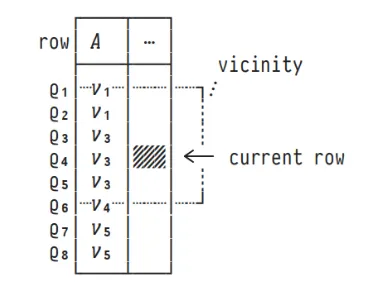
In the above figure, Q4 is the current row and Q1 to Q6 is the frame. When the current row is Q5, the frame will be Q1 to Q7. As the current row changes, the window slides with it.
NOTE: Window semantics depend on a defined row ordering.
How to define a boundary to a window or frame?
Row vicinity (window, frame) is based on either:
- row position (ROWS windows),
- row valuesᵢ (RANGE windows),
- row peers (GROUPS windows).
Let us see how to define a frame using ROWS, RANGE, and GROUPS frames and their differences
1. ROWS
window_function OVER (ORDER BY A₁,..., Aₙ [ ROWS frame ])
- OVER clause is the indication that the query is a window function.
- ORDER BY clause is mandatory in any window function.
- The data stored in the database is unordered. Window functions are meaningless when operated on unordered data.
- ROWS tag is used to define row-based frame or window
- Frame – frame is the boundary of the window.
Frames examples –
- UNBOUNDED PRECEDING AND CURRENT ROW
- BETWEEN 1 PRECEDING AND 2 FOLLOWING
- BETWEEN CURRENT ROW AND UNBOUNDED FOLLOWING
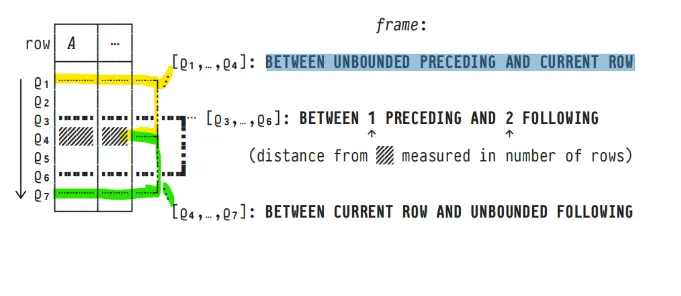
In the above figure, the current row is Q4.
When the frame is defined as BETWEEN UNBOUNDED PRECEDING AND CURRENT ROW, then the frame is considered from the first record till the current row.
(highlighted in yellow)
When the frame is defined as BETWEEN 1 PRECEDING AND 2 FOLLOWING,
then the frame is Q3, Q4, Q5, Q6 (highlighted in black)
Q4 – current row
Q3 – 1 preceding
Q5 and Q6 – 2 following
When the frame is defined as BETWEEN CURRENT ROW AND UNBOUNDED FOLLOWING, then the frame is considered from the current row till the last record (highlighted in green)
Time to get our hands dirty
Let us see with an example.
We will create a dummy table with some records and see the ROWS frame in action.
  DROP TABLE IF EXISTS sample;
  CREATE TABLE sample (
  row text PRIMARY KEY,
    a   int,
    b   BOOLEAN
  );

  INSERT INTO sample(row, a, b) VALUES
  ('Q1', 1, false),
  ('Q2', 2, true),
  ('Q3', 3, true),
  ('Q4', 3, false),
  ('Q5', 3, true),
  ('Q6', 4, true),
  ('Q7', 6, false),
  ('Q8', 6, false),
  ('Q9', 7, true);
Query 1 : ROWS frame example
  SELECT w.row                     AS "current row",
         w.a,

         COUNT(*)         OVER win AS "frame size",
         array_agg(w.row) OVER win AS "rows in frame"
  FROM   sample AS w
  WINDOW win AS (ORDER BY w.a ROWS BETWEEN UNBOUNDED PRECEDING AND CURRENT ROW);
Working –
From the table sample, all the records are extracted individually and stored in a row variable “w”.
In the SELECT clause, we are displaying w.row and w.a from the row variable “w”
COUNT(*) OVER win AS "frame size"
This is the same as COUNT(*) OVER (ORDER BY w.a ROWS BETWEEN UNBOUNDED PRECEDING AND CURRENT ROW) AS “frame size” OVER – OVER clause is the indication that the subquery is a window function ORDER BY w.a – All the rows are ordered by “a – int” field.
ROWS – The frame window is of type ROWS.
BETWEEN UNBOUNDED PRECEDING AND CURRENT ROW – From the beginning of the table to the current row
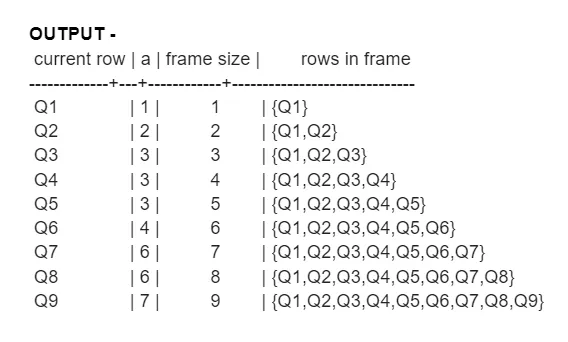
Query 2 : ROWS frame example
  SELECT w.row             AS "current row",
         w.a,
         SUM(w.a) OVER win AS "∑ a (so far)"
  FROM   sample AS w
  WINDOW win AS (ORDER BY w.a ROWS BETWEEN UNBOUNDED PRECEDING AND CURRENT ROW);


  SUM(w.a) OVER (ORDER BY w.a ROWS BETWEEN UNBOUNDED PRECEDING AND CURRENT ROW) AS "∑ a (so far)
Sum of values from the beginning of the table till the current row.
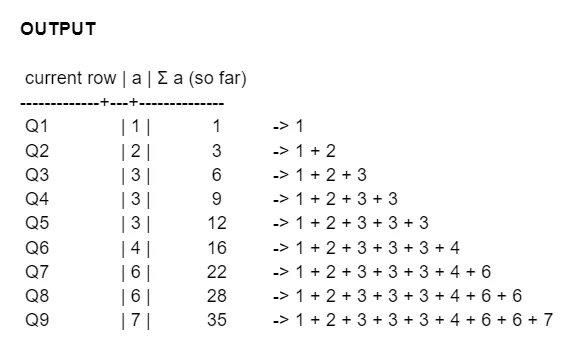
In Django
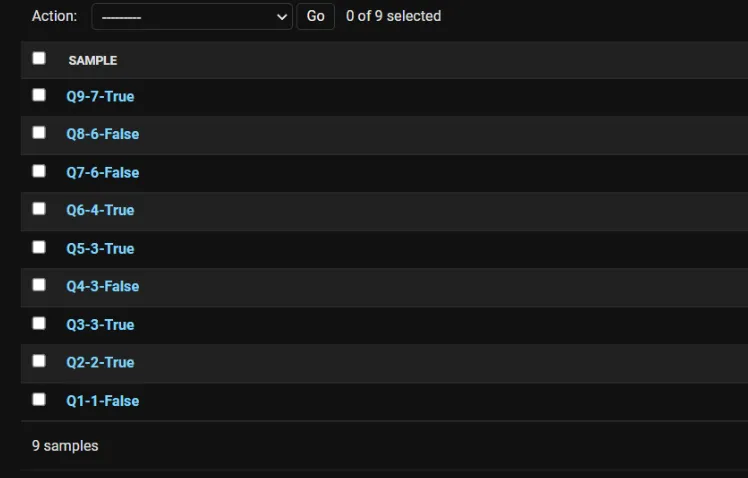
Create a model same as the table above and fill the records using Admin Panel
  class Sample(models.Model):
      row = models.CharField(max_length=5)
      a = models.PositiveIntegerField()
      b = models.BooleanField(default=True)

      def __str__(self):
          return self.row + "-" + str(self.a) +"-" + str(self.b)
Django Query 1 : ROWS frame example
  from .models import Sample
  from django.db.models import Avg, F, RowRange, Window, Count

  qs = Sample.objects.annotate(
            frame_size = Window(
                expression=Count('a'),
                frame=RowRange(start=None, end=0),
                order_by=F('a').asc()
            ),
  )

  for i in qs:
    print(i.row, i.a, i.b, i.frame_size)
RowRange – This attribute sets the frame_type to ‘ROWS’.
RowRange takes 2 parameters ( start and end)
The accepted values for the start and end arguments are None, an integer, or zero.
A negative integer for start results in N preceding, while None yields UNBOUNDED PRECEDING.
For both start and end, zero will return CURRENT ROW. Positive integers are accepted for the end.
Start, end
=> 0 – current row
Start
=> -value (-2) – preceding 2
=> None – unbounded preceding
End
=> +value (+2) – following 2
=> None – unbounded following
Each window function should have an expression field that computes to some aggregate
value
Q1 1 False 1
Q2 2 True 2
Q3 3 True 3
Q4 3 False 4
Q5 3 True 5
Q6 4 True 6
Q7 6 False 7
Q8 6 False 8
Q9 7 True 9
Django Query 2 : ROWS frame example
  from .models import Sample
  from django.db.models import Avg, F, RowRange, Window, Count, Sum

  qs = Sample.objects.annotate(
              running_sum = Window(
                  expression=Sum('a'),
                  frame=RowRange(start=None, end=0),
                  order_by=F('a').asc()
              ),
  )

  for i in qs:
      print(i.row, i.a, i.b, i.running_sum)
OUTPUT –
Q1 1 False 1
Q2 2 True 3
Q3 3 True 6
Q4 3 False 9
Q5 3 True 12
Q6 4 True 16
Q7 6 False 22
Q8 6 False 28
Q9 7 True 35
Alternatively, we can create a dictionary to specify window functions and use it as shown in the example below.
  from .models import Sample
  from django.db.models import Avg, F, RowRange, Window, Count, Sum

  window = {
  'frame': RowRange(start=None, end=0),
  'order_by': F('a').asc()
  }

  qs = Sample.objects.annotate(
              running_sum = Window(
                  expression=Sum('a'), **window
              ),
              frame_size = Window(
                  expression=Count('a'), **window
              ),
  )

  for i in qs:
      print(i.row, i.a, i.b, i.frame_size, i.running_sum)
OUTPUT –
Row a b frame_size running sum
Q1 1 False 1 1
Q2 2 True 2 3
Q3 3 True 3 6
Q4 3 False 4 9
Q5 3 True 5 12
Q6 4 True 6 16
Q7 6 False 7 22
Q8 6 False 8 28
Q9 7 True 9 35
2. RANGE and GROUPS
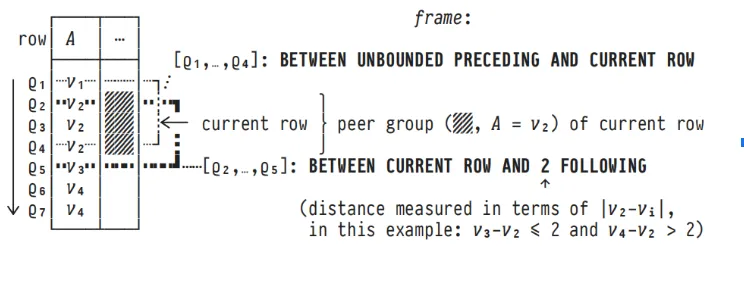
RANGE (row values) –
Similar values are considered as a single unit or peers (1 range). We don’t operate on a single current row but on a single current peer.
window_function OVER (ORDER BY A₁,...,Aₙ [ RANGE frame ])
Example
row | a | b
—–+—+——-
Q1 | 1 | false
Q2 | 2 | true
Q3 | 3 | true
Q4 | 3 | false
Q5 | 3 | true
Q6 | 4 | true
Q7 | 6 | false
Q8 | 6 | false
Q9 | 7 | true
When the current row is Q3, all its peer values are considered as a single unit. For Q3, when the frame specification is 2 FOLLOWING – it means the value of ‘a’ less than or equal to 2.
Q4 => 3-3 = 0
Q5 => 3-3 = 0
Q6 => 4-3 = 1
Q7 => 6-3 = 3
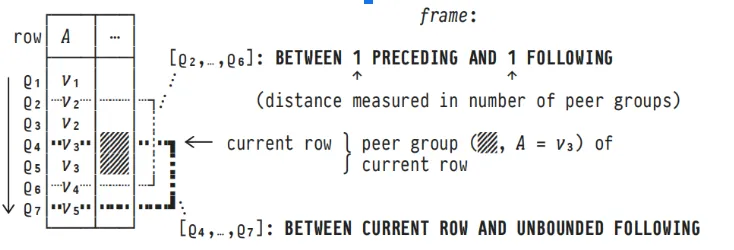
GROUPS (row groups) –
window_function OVER (ORDER BY A₁,...,Aₙ [ GROUPS frame ])
Similar values are considered as a single unit or group. Each group is considered as 1 unit in window functions
row | a | b
—–+—+——-
Q1 | 1 | false
Q2 | 2 | true
Q3 | 3 | true
Q4 | 3 | false
Q5 | 3 | true
Q6 | 4 | true
Q7 | 6 | false
Q8 | 6 | false
Q9 | 7 | true
Q3, Q4, Q5 have the same ‘a’ value – 3. All these values are considered as a single unit.
Q7, Q8 has the same ‘a’ value – 6. These 2 rows are considered as a single unit.
Example –
Q6 is the current row.
The frame is 1 PRECEDING AND 1 FOLLOWING
1 PRECEDING is 1 group -> Q3, Q4, Q5 (as it is considered as 1 group)
1 FOLLOWING is 1 group -> Q7 and Q8
Query 3 : RANGE frame example
  SELECT w.row                     AS "current row",
         w.a,
         COUNT(*)         OVER win AS "frame size",
         array_agg(w.row) OVER win AS "rows in frame"
  FROM   sample AS w
  WINDOW win AS (ORDER BY w.a RANGE BETWEEN CURRENT ROW AND 2 FOLLOWING)
  ORDER BY w.a;
OUTPUT –
current row | a | frame size | rows in frame
————-+—+————+——————
Q1 | 1 | 5 | {Q1,Q2,Q3,Q4,Q5}
Q2 | 2 | 5 | {Q2,Q3,Q4,Q5,Q6}
Q3 | 3 | 4 | {Q3,Q4,Q5,Q6}
Q4 | 3 | 4 | {Q3,Q4,Q5,Q6}
Q5 | 3 | 4 | {Q3,Q4,Q5,Q6}
Q6 | 4 | 3 | {Q6,Q7,Q8}
Q7 | 6 | 3 | {Q7,Q8,Q9}
Q8 | 6 | 3 | {Q7,Q8,Q9}
Q9 | 7 | 1 | {Q9}
Explanation –
RANGE BETWEEN CURRENT ROW AND 2 FOLLOWING means the value must be 2 or less than the current value
Let’s take Q6 as the current row.
Q6 | 4 | 3 | {Q6,Q7,Q8}
Q7 => 6 – 4 = 2
Q8 => 6 – 4 = 2
Q9 => 7 – 4 = 3
Query 4 : GROUPS frame example
  SELECT w.row                     AS "current row",
         w.a,
         COUNT(*)         OVER win AS "frame size",
         array_agg(w.row) OVER win AS "rows in frame"
  FROM   sample AS w
  WINDOW win AS (ORDER BY w.a GROUPS BETWEEN CURRENT ROW AND 2 FOLLOWING)
  ORDER BY w.a;
OUTPUT –
current row | a | frame size | rows in frame
————-+—+————+———————
Q1 | 1 | 5 | {Q1,Q2,Q3,Q4,Q5}
Q2 | 2 | 5 | {Q2,Q3,Q4,Q5,Q6}
Q3 | 3 | 6 | {Q3,Q4,Q5,Q6,Q7,Q8}
Q4 | 3 | 6 | {Q3,Q4,Q5,Q6,Q7,Q8}
Q5 | 3 | 6 | {Q3,Q4,Q5,Q6,Q7,Q8}
Q6 | 4 | 4 | {Q6,Q7,Q8,Q9}
Q7 | 6 | 3 | {Q7,Q8,Q9}
Q8 | 6 | 3 | {Q7,Q8,Q9}
Q9 | 7 | 1 | {Q9}
Explanation –
Current row – Q6
Window frame – GROUPS BETWEEN CURRENT ROW AND 2 FOLLOWING
Q7, Q8 – 1 FOLLOWING
Q9 – 2 FOLLOWING
Django Query 3 : RANGE frame example
  from .models import Sample
  from django.db.models import Avg, F, RowRange, Window, Count, ValueRange

  qs = Sample.objects.annotate(
  frame_size = Window(
    expression=Count('a'),
    frame=ValueRange(start=0, end=2),
    order_by=F('a').asc()
  ),
  )

  for i in qs:
    print(i.row, i.a, i.b, i.frame_size)
OUTPUT –
Q1 1 False 5
Q2 2 True 5
Q3 3 True 4
Q4 3 False 4
Q5 3 True 4
Q6 4 True 3
Q7 6 False 3
Q8 6 False 3
Q9 7 True 1
ValueRange- This attribute sets the frame_type to ‘RANGE’.
ValueRange takes 2 parameters ( start and end) the same as RowRange.
ROWS vs RANGE vs GROUPS
| Feature | ROWS | RANGE | GROUPS |
|---|---|---|---|
| Frame based on | Physical row positions | Ordered values | Peer groups |
| Duplicate values | Each row is counted separately | Duplicate values are treated as peers | Entire peer groups are treated as one unit |
| Best for | Running totals and row-by-row calculations | Financial calculations and value-based analysis | Ranking and grouped analytics |
| Performance | Fast | Moderate | Moderate |
| PostgreSQL support | Yes | Yes | Yes |
Which SQL window frame should you choose?
Choose ROWS when every individual row matters, such as calculating cumulative sales transactions.
Choose RANGE when rows with the same ordered value should behave as peers, making it useful for financial reporting and price analysis.
Choose GROUPS when calculations should operate across groups of identical ordered values instead of individual rows, making it valuable for ranking and analytical reporting.
Industry use cases for SQL window functions
SQL window functions are widely used across industries.
-
Finance: Running balances and cumulative revenue
-
E-commerce: Customer purchase analysis
-
Healthcare: Patient trend reporting
-
SaaS: Product usage analytics
-
Logistics: Delivery performance tracking
Frequently Asked Questions
What is a SQL window function?
A window function computes a value for each row based on a set of related rows around it, called the window or frame. Unlike aggregate functions such as SUM or COUNT, which collapse a group of rows into one result row, a window function returns one row for every input row. It was introduced to the ISO SQL Standard in SQL:2003.
What is the difference between ROWS, RANGE and GROUPS?
All three define the frame boundary, but they count differently. ROWS counts physical row positions, so 1 PRECEDING means exactly one row back. RANGE counts by the value in the ORDER BY column, so 2 FOLLOWING means every row whose value is within 2 of the current value. GROUPS counts peer groups, so 1 FOLLOWING means the whole next set of tied rows, however many rows that is.
Is ORDER BY required in a window function?
Not strictly. PostgreSQL allows OVER without ORDER BY, in which case the frame is the entire partition. But without an ordering, “preceding” and “following” have no meaning, and results are not deterministic. In practice, any frame specification using PRECEDING or FOLLOWING needs ORDER BY to be useful.
What is the default window frame if I do not specify one?
If ORDER BY is present, the default is RANGE BETWEEN UNBOUNDED PRECEDING AND CURRENT ROW, which includes all rows from the start of the partition through the last peer of the current row. If ORDER BY is omitted, the frame is every row in the partition.
How do I use window function frames in the Django ORM?
Pass a frame object to Window. RowRange sets the frame type to ROWS and ValueRange sets it to RANGE. Both take start and end: None means unbounded, 0 means current row, a negative start means N preceding, and a positive end means N following. Django has no equivalent class for a GROUPS frame, so that one requires raw SQL.
Can I reuse the same window across multiple columns?
Yes. Name it once with the WINDOW clause and reference it by name in each OVER, as in WINDOW win AS (ORDER BY w.a ROWS BETWEEN UNBOUNDED PRECEDING AND CURRENT ROW). In Django, define the window settings in a dictionary and unpack it into each Window call with **window.
Key takeaways
SQL window functions make analytical queries significantly more powerful by allowing calculations across related rows while preserving every record.
-
Use ROWS for row-by-row calculations.
-
Use RANGE for value-based peer calculations.
-
Use GROUPS for grouped analytical reporting.
-
PostgreSQL and Django ORM both support these techniques for scalable analytics.
At Bluetick Consultants, we help engineering teams build scalable PostgreSQL and Django solutions using advanced SQL techniques for analytics, reporting, and high-performance backend applications.
The examples in this article are based on PostgreSQL documentation, SQL window function behavior defined by SQL standards, and practical implementation experience with Django ORM.
This is not the end of window functions. There are more interesting and useful functions. To learn more about window functions refer to the next part of this blog series.